Tweaking ASSP Deluxe for cPanel & ASSP Tweaking ASSP Deluxe for cPanel & ASSP |
 |
In this page you can
find articles to tweak ASSP and to reach
better usage of ASSP Deluxe for cPanel . If
you would add an article please send an email
here with your credits (your
business url and full name). Use
these tweaks at your risk . |
|
|
Latest recommended RBLs #08
|
|
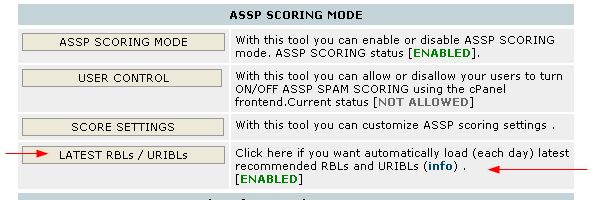
If you have latest ASSP
WHM 8.x or above RBLs (and URIBLs)
can be updated automatically daily
using the ex_localdomains.php cronjob
|
|
|
Latest recommend URIBLs
#08b
|
|
If you have latest ASSP
WHM 8.xor above URIBLs (and RBLs)
can be updated automatically daily
using the ex_localdomains.php cronjob
|
|
|
Latest
recommended ASSP usage
#09
Please open your ASSP WHM interface and click "ASSP Deluxe for
cPanel checklist" . Apply the checklist.
ASSP 1.9.x what's NEW and advanced
settings #11
|
With ASSP 1.9.x you will find some
new powerful
features some enabled some disabled by default which you can enable using
ASSP Web Interface depending on your needs. |
-- There are no more preloaded "relaxed/moderated/aggressive" spam
settings in your ASSP WHM > SCORE settings.
BY default ASSP starts with moderate spam settings , and the
customer can set the desidered spam setting level
per domain using his ASSP cPanel frontend
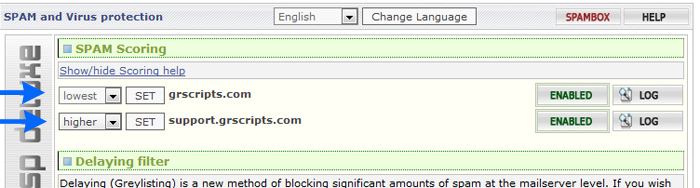
It's possible applying correct values to Scoring menu / Spam
Friends . If you want you can use Spam Friends
also to set custom settings lever per email .
If you want change default scoring menu you can use the scoring settings menu in ASSP web interface . Now all
the spam scores used by "ASSP Scoring" menu are listed in ASSP web
interface > scoring settings. Scoring settings are automatically
set when you enable or
disable ASSP scoring mode, or when you upgrade your ASSP using your ASSP WHM
. The values can be customized using the ASSP web interface > scoring
setting menu.
-- By default all blocked email will bounce with a NOSPAMTAG . If
the sender receives the bounce he can resend
including in the email the NOSPAMTAG code . The
NOSPAMTAG is re-genereated each 24 hours using
ex_localdomains.php
This is bounced error message received when an email is blocked
554 5.7.1 Mail (SESSIONID) appears to be unsolicited - REASON - resend
with the code NOTSPAMTAG appended to subject and ask to have your email
whitelisted (the code NOTSPAMTAG changes each 24 hours).
-- if you upgraded now to ASSP 1.9 please be sure you applied the
checklist
Please open your ASSP WHM interface and click "ASSP Deluxe for
cPanel checklist" . Apply the checklist.
-- if you upgraded now to ASSP 1.9 please be sure to read again the
post installation steps
Something changed in the way you STOP and START ASSP , plus other
news.
-- New Configuration Sharing menu . It allows you share between
your ASSP assp.cfg between your servers .
-- SMTP Session Limits menu , default attachment size limits
|
|
Max Size : it is the email
size of an email in bytes
Max Real Size : it is rcpt
size of the email message in bytes,
email size per number of email
recipients (rcpt)
What is local and remote ?
local email: an email sent FROM your
server from a local email . All email
which have a domain listed in
/etc/localdomains are considered local .
remote/external email : an email
sent from a remote server from an email
which is not in your server TO your
server |
|
|
|
Max email Size limits |
| -- ASSP Web interface >
SMTP session limits > Max Size of
Local Message Adresses (MaxSizeAdr) . Now you can set
individual maxSize values (email size limit in bytes) for
local email addresses,
domains, user names and IP addresses .
-- ASSP web interface > SMTP session limits
> Max Size of Incoming Message (maxSizeExternal) : You can specificy max
email size of an email coming from external.
By default it's set to 52428800 bytes (or 50 MB)
-- ASSP web interface > SMTP session limits
> Max Size of External Message Adresses (MaxSizeExternalAdr)
. Now you can set individual max Size values (email size
limit in bytes) for remote/external
email addresses, domains, user names and IP addresses .
-- ASSP web interface > SMTP session limits
> Max Size of Outgoing Message (maxSize) : You
can specificy max email size of an email sent
locally . By default it's set to 52428800 bytes (or
50 MB) |
|
Max email Real Size limits (email size per number of recipents) |
| -- ASSP Web interface >
SMTP session limits > Max Real Size
of Local Message Adresses* (MaxRealSizeAdr) . Now you can set
individual MaxRealSizeAdr values (email size limit in bytes
per number of recipients) for local
email addresses, domains, user names and IP addresses .
-- ASSP web interface > SMTP session limits
> Max Real Size of Incoming Message (maxRealSizeExternal) : You can
specificy Max real sizes (email size limit in bytes per number of
recipients) of an email coming from external.
By default it's set to 157286400 bytes (150MB)
-- ASSP web interface > SMTP session limits
> Max Real Size of External Message Adresses* (MaxRealSizeExternalAdr)
. Now you can set individual Max real sizes (email size limit in
bytes per number of recipients) for
remote/external email addresses, domains, user names and IP
addresses .
-- ASSP web interface > SMTP session limits
> Max Real Size of Outgoing Message (maxRealSize)
: You can specificy max real email size (email size limit in bytes
per number of recipients) of an email sent
locally . By default it's set to 52428800 bytes (or
50 MB) |
-- New scoring settings menu in ASSP web interface . Now all
the spam scores used by "ASSP Scoring" menu are listed in ASSP web
interface > scoring settings. Scoring settings are automatically
set when you enable or
disable ASSP scoring mode, or when you upgrade your ASSP using your ASSP WHM
. The values can be customized using the ASSP web interface > scoring
setting menu.
-- In your ASSP WHM interface you can find several new features
LOG button which shows your the ASSP log in real time
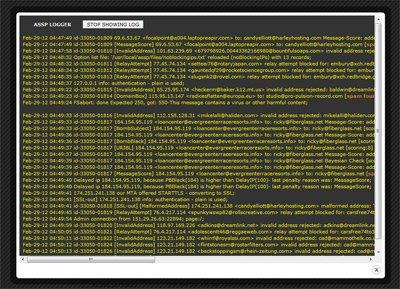
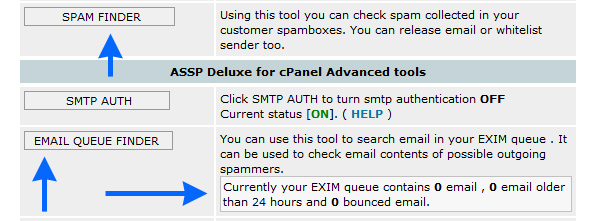
New SSL MENU

New RWL Validation

New SPAM FINDER and new EMAIL QUEUE FINDER
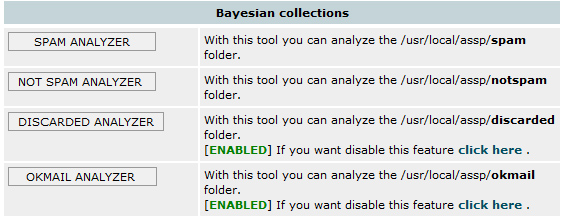
Bayesian collection Analyzers have been improved. Now you can easly find errors
in SPAM ANALYZER and OKMAIL ANALYZER thanks to new [GOOD
?] and [SPAM ?] TAGS.
- cPanel frontend 7.0 for your end users greatly improved , also the HELP
section is now more clear and complete .
- find_abusers.php has been improved , now executes faster and collections of
bad ip is more sure .
This is the new recommended find_abusers.php cronjob, if you upgraded to ASSP
1.9 updated it as possible.
*/20 * * * * /usr/local/cpanel/3rdparty/bin/php-cgi
/usr/local/assp/deluxe/find_abusers.php sw=39 rl=50 dc=40 on=1
-- Default Attachment configuration , Attachment checking menu
With default ASSP antivirus/attachment configuration
following attachments are not allowed (cannot be
received)
ad[ep]|asx|ba[st]|chm|cmd|com|cpl|crt|dbx|exe|hlp|ht[ab]|in[fs]|isp|js|jse|lnk|md[abez]|mht|ms[cipt]|nch|pcd|pif|prf|reg|sc[frt]|sh[bs]|vb|vb[es]|wms|ws[cfh]
Please note that ad[ep] means .ade and .adp , ba[st] means .bas and
.bat and so on ...
You can receive these attachments only if they
are compressed using .zip
Infact if anyone try to send your assp server above attachments the sender
receives following error
500 These attachments are not allowed -- Compress
before mailing.
Following extensions are allowed
ai|asc|bhx|dat|doc|eps|gif|htm|html|ics|jpg|jpeg|hqx|pdf|ppt|rar|rpt|rtf|snp|txt|xls|zip
You can change these settings using your ASSP Web Interface as required
( attachment menu ).
Do Not Copy Messages Above This MessageTotal score : Copy Spam/Ham menu > ccMaxScore
By default all rejected messages will go on spambox. If you set a
ccMaxScore 70 (i.e.) all email rejected with a score >= 70 will
not go on user spambox.
- Email interface
: ASSP email interface has been improved with
1.9
Over the default commands assp-white@ , assp-notwhite@, assp-spam@,
assp-notspam@, assp-red@, asspanalyze@ you will find also
asspblock@ ; if a client send the request to
asspblock@clientdomain.com from info@clientdomain.com ,
he receives an
email with a list of all the email rejected last 5 days (data extracted from current
maillog.txt) .
The client can also click the email to resend the email .
asspof@ ; if a client send the request to
asspof@clientdomain.com from info@clientdomain.com ,
info@clientdomain.com will be
added on the ASSP noprocessing list . The email
info@clientdomain.com will bypass all antispam checks .
asspon@ ; same of asspof but to remove an
email from noprocessing
A
powerful tool , find_abusers.php #06
please read this article
ASSP
SSL support on port 465 using
stunnel (#03)
|
|
If you have ASSP WHM 6.x and ASSP
1.9 DO NOT
follow the SSL stunnel below, please
use the ASSP WHM INTERFACE > SSL MENU to setup your ASSP SSL .
. |
|
|
Be sure your all your ASSP alternative ports
(listenPort2) are allowed on your
firewall (TCP IN/OUT).
Using below "how to" you can use SMTP SSL/TLS to
send email securely using port 465.
If you want secure imap receiving , you should use port 143 with
STARTTLS
If you want secure pop3 receiving , you should use port 110 with
STARTTLS
Thanks to Szymon Rybczynski (pro-net-hosting.com
and prohost.pl)
HOW TO
All lines starting with # are commands to execute as root.
1. You need stunnel installed. Cpanel should have stunnel installed. To
check:
# stunnel -version
If you get something like "stunnel 4.05 on i686-redhat-linux-gnu
PTHREAD+LIBWRAP with OpenSSL 0.9.7a Feb 19 2003" you can continue.
2. You can make your own certificate for SSL or use
cPanel cert. This howto
shows how to use cPpanel cert. To make your own cert just search google for
instruction and change cert path in stunnel.conf to your cert.
3. Setting up stunnel user and config file:
# adduser stunnel;passwd stunnel
Set password for user stunnel
# cd /etc/stunnel;nano -w stunnel.conf
copy and paste this:
cert = /etc/stunnel/cpanel.pem
chroot = /usr/local/cpanel/var/run/stunnel-assp/
pid = /stunnel.pid
setuid = stunnel
setgid = stunnel
output = /var/log/stunnel.log
[ssmtp]
accept =
465
connect = 127.0.0.2:26 |
|
|
note : you should replace 26
with your preferred alternative port you
have setup in listenPort2 , by default
you will find port 26 |
|
|
Save the file.
4. Copy cPanel cert.
If you have set correctly your own certificate for
your cpanel/exim services in
WHM > Service Configuration >> Manage Service SSL Certificates
execute this
# cp
/var/cpanel/ssl/cpanel/mycpanel.pem /etc/stunnel/cpanel.pem
otherwise execute this
# cp
/var/cpanel/ssl/cpanel/cpanel.pem /etc/stunnel/cpanel.pem
Note : if /usr/local/cpanel/etc/cpanel.pem
or (mycpanel.pem) does not exists you can
find
the cpanel certificate also here
/var/cpanel/ssl/cpanel/cpanel.pem , in this case execute this
# cp
/usr/local/cpanel/etc/cpanel.pem /etc/stunnel/ |
Now execute this
# cd
/etc/stunnel/;chown stunnel.stunnel cpanel.pem
5. Create run dir.
# cd /usr/local/cpanel/var/run/;mkdir stunnel-assp;chown stunnel.stunnel stunnel-assp
6. Setup 127.0.0.2 - if you don't do this you will create open relay on SSL
port.
# cp /etc/sysconfig/network-scripts/ifcfg-lo
/etc/sysconfig/network-scripts/ifcfg-lo:1;
# nano -w /etc/sysconfig/network-scripts/ifcfg-lo:1
Change it to look like this:
DEVICE=lo:1
IPADDR=127.0.0.2
NETMASK=255.0.0.0
NETWORK=127.0.0.0
BROADCAST=127.255.255.255
ONBOOT=yes
NAME=myloop |
Save.
7. Now bring lo:1 up.
# /etc/sysconfig/network-scripts/ifup-aliases lo
# ifconfig
It should now list 127.0.0.2
8. Login to ASSP web interface (ip:55555) and change:
Network Setup:
------------
Second SMTP Listen Port
26
------------
Second SMTP Destination
127.0.0.1:125
------------
Force SMTP AUTH on Second SMTP Listen Port
Checked
------------
Relaying:
------------
Accept All Mail
127.0.0.1
If you make a mistake here you can make your mail server open relay so
double check the settings.
8. Open TCP IN/OUT port 465 on your firewall.
9. Now you are ready to start stunnel. Execute:
# stunnel /etc/stunnel/stunnel.conf
At this moment your SSL connection should work. Test it:
# openssl s_client -quiet -connect localhost:465
If you get error then something is wrong and you need to check
/var/log/stunnel.log
If you get something like:
"depth=0
/C=US/ST=Unknown/L=Unknown/O=Unknown/OU=Unknown/CN=dom.host.com/emailAddress=ssl.net
verify error:num=18:self signed certificate
verify return:1
depth=0
/C=US/ST=Unknown/L=Unknown/O=Unknown/OU=Unknown/CN=dom.host.com/emailAddress=ssl.net
verify return:1
220-pol.nameserverus2.com ESMTP Exim 4.63 #1 Mon, 23 Jul 2007 15:42:14 +0200
220-We do not authorize the use of this system to transport unsolicited,
220 and/or bulk e-mail."
Everything is ok and ready to use.
| Note |
If you don't want see
SSL popup when you send email using port 465 be sure that at
point 4) you copied the mycpanel.pem certificate and
your users must send email using as smtp the address of
your shared ssl . If you change the .pem file , and you
can't see the new certificate loaded correctly using
# openssl s_client -quiet -connect localhost:465
execute this
# service cpanel restart
# /usr/local/cpanel/3rdparty/bin/php-cgi
/usr/local/assp/deluxe/ex_localdomains.php
now if you execute this
# openssl s_client -quiet -connect localhost:465
you should see your server SSL certificate. |
|
10. if you would monitor stunnel daemon in case
it goes down you can add check_ssl=yes to your status.php cron in this
way
*/2 * * * * /usr/local/cpanel/3rdparty/bin/php-cgi
/usr/local/assp/deluxe/status.php check_ssl=yes
If you are using an alternative port different from port 26 , i.e. 40000
, in this case you should add also altport=40000
*/2 * * * * /usr/local/cpanel/3rdparty/bin/php-cgi
/usr/local/assp/deluxe/status.php check_ssl=yes altport=40000
Unofficial clamD signatures
(#8)
By default you should already have Unofficial clamD signatures
installed if you followed the installation HOW TO . If you installed them
incorrectly or if you uninstalled signatures and you would reinstall them,
please read the following
If you would
uninstall them read
here
You can use Unofficial clamD signatures along with ASSP and existents
clamd official signatures to greatly improve SPAM and virus detection.
Requirements ; be sure your clamd is running
ps aux | grep -m1 "clamd"
and be sure ASSP is using clamd in this way ; open the stat page of your ASSP
Web interface
http://www.yousite.net:55555/infostats
Click Perl Modules , and if your have "File::Scan::ClamAV 1.8 installed and
available" your clamd is working fine.
Finally be sure you have ASSP Deluxe 4.3.0 or above and ASSP WHM 4.4.0
or above .
Note: by default email verified as bad by unofficial clamd signatures
are SCORED (using vsValencePB by default set to 36) as soon the
unofficial signature is verified .
|
|
If you want block (instead of
score) all unofficial
signatures simply remove UNOFFICIAL
in ClamAV and FileScan
menu > SuspiciousVirus and
execute this from console
echo "SuspiciousVirus" >>
/usr/local/assp/deluxe/no_auto_settings |
|
|
Now ,
In order to use and update automatically each day unofficial clamd signatures , simply get into your crontab (crontab -e) and add
this line near your ASSP Deluxe crons:
0 5 * * * /usr/local/cpanel/3rdparty/bin/php-cgi
/usr/local/assp/deluxe/signatures.php
Unofficial signatures will be updated each day at 05:00 AM (the script
contains internal checks to avoid more frequent updates since if you try
updating signatures more often your server ip can be easly banned) . The script before
starting waits a random amount of time (1m-30m) to make sure everyone using this
script doesn't go
and download the definitions at the top of the hour.
The script signatures.php loads , installs and updates
automatically each day following unofficial clamd signatures ;
Sanesecurity unofficial signatures (link)
junk.ndb
scam.ndb
rogue.hdb
spamimg.hdb
jurlbl.ndb
phish.ndb
INetMsg-SpamDomains-2w.ndb
lott.ndb
spam.ldb
spear.ndb
jurlbla.ndb
scamnailer.ndb
winnow_phish_complete_url.ndb
doppelstern.ndb
doppelstern.hdb
bofhland_cracked_URL.ndb
bofhland_malware_URL.ndb
bofhland_phishing_URL.ndb
spearl.ndb
spamattach.hdb
crdfam.clamav.hdb
sanesecurity.ftm
sigwhitelist.ign2
sanesecurity.ftm
securiteinfo.com unofficial signatures (link)
http://clamav.securiteinfo.com/honeynet.hdb
http://clamav.securiteinfo.com/securiteinfo.hdb
http://clamav.securiteinfo.com/antispam.ndb
http://clamav.securiteinfo.com/securiteinfobat.hdb
http://clamav.securiteinfo.com/securiteinfodos.hdb
http://clamav.securiteinfo.com/securiteinfoelf.hdb
http://clamav.securiteinfo.com/securiteinfohtml.hdb
http://clamav.securiteinfo.com/securiteinfooffice.hdb
http://clamav.securiteinfo.com/securiteinfopdf.hdb
http://clamav.securiteinfo.com/securiteinfosh.hdb
All the signatures.php script activity is logged here
tail -f /usr/local/assp/deluxe/signatures.log
When all your signatures will be loaded for the first time (it could require
also 1 hour to upload all your signatures , due to antiabuse sleeping time)
, ASSP spam detection could/will improve greatly .
Note: by default email verified as bad by unofficial clamd signatures
are SCORED (using vsValencePB by default set to
42) as soon the
unofficial signature is verified .
|
|
If you want block (instead of
score) all unofficial
signatures simply remove UNOFFICIAL
in ClamAV and FileScan
menu > SuspiciousVirus and
execute this from console
echo "SuspiciousVirus" >>
/usr/local/assp/deluxe/no_auto_settings |
|
|
How to identify which unofficial clamd database
scored an email
If you have an email blocked like this in your ASSP maillog
Mar-15-12 10:47:41 id-33182-00548 [VIRUS][scoring]
17.65.161.168 <t0ri@flickr.com> to: cny8@rtir.com
'Sanesecurity.Junk.39499.UNOFFICIAL' passing the virus check because of only
suspicious virus 'UNOFFICIAL';
and you want know which is the unofficial clamd database which scored the
email , get the first part Sanesecurity.Hdr.7928
(without UNOFFICIAL) from Sanesecurity.Hdr.7928.UNOFFICIAL string , and grep
it in this way
# grep "Sanesecurity.Junk.39499"
/usr/share/clamav/*
You will receive following result , which will show you
the clamd signature db (below shown in green)
which blocked the email
/usr/share/clamav/scam.ndb:Sanesecurity.Junk.39499:4:*:46726f6d3a202250656e69732047726f777468204672656520747269616c22203c
Unofficial clamd signatures , advanced settings
|
|
The usage
of unofficial and all official clamd
signatures listed below require about
150 MB RAM .If you do not
have enough RAM you may experience clamd
failures ; in this case you should
remove the cron signatures.php or
exclude some signature as
explained below .
Using the
code below you can exclude some signatures also to safe some RAM in your system. The usage of all signatures
need about 150 MB RAM. If you have ASSP deluxe 5.1.4 or above signatures.php
will detect VPS and will load
automatically only low memory
signatures. |
|
|
You may using following values added to your signatures.php cronjob ;
sa=0 : if you want skip/disable Sanesecurity signatures
se=0 : if you want skip/disable securiteinfo.com signatures
vps=1 : if you want install only low memory signatures (recommended for
low memory VPS)
rn=0 : if you want skip/disable the starting random "sleeping" (1 max 30
minutes)
ff=0 : if you want skip the 24 hours delay after each update (not
recommended)
sg=0 : if you want skip the gpg Sanesecurity signature check (faster)
dx=1 : UNINSTALL all the unofficial signatures (no update is executed)
I.e. if you want
uninstall unofficial clamd signatures
you should use this
# /usr/local/cpanel/3rdparty/bin/php-cgi
/usr/local/assp/deluxe/signatures.php dx=1
If you would report a
bug/idea/suggestion/feedback
related with Unofficial clamd
signatures please send an email
clicking here.
How to uninstall UNOFFICIAL clamAV signatures ?
#clamav_un
Execute this from console
# /usr/local/cpanel/3rdparty/bin/php-cgi
/usr/local/assp/deluxe/signatures.php dx=1
and remove the cronjob
0 5 * * * /usr/local/cpanel/3rdparty/bin/php-cgi
/usr/local/assp/deluxe/signatures.php